In this blog series, I will explain how to develop your own Chromium fork with fingerprint mimicry.
Our goal is to be able to edit basic fingerprints, like the user-agent, the CPU core counts, but also more complicated entropy sources such as canvas fingerprinting.
When playing Minecraft, the first step is to get a good pickaxe. Ideally, an iron one because it’s just so much faster than a stone one and allows mining diamonds.
Chromium development is the same! You need a good laptop/desktop if you want to be effective.
Alternatives to Local Development
You might be wondering: why not setup some kind of remote development to be able to keep using your current laptop?
I will explain my reasoning a little bit in this section.
Why not use a beefy Hetzner server?
When I first started Chromium development, I used an ARM Asahi Linux machine coupled with a beefy Hetzner x86_64 server with a trillion cores and 2PB memory.
I really loved that setup, which worked fine except that:
- sometimes, my Internet connection became spotty; one of the bottlenecks was downloading the build artifacts.
- I can’t quite remember if I was doing cross-compilation on the server or using FEX/BOX64 (Rosetta equivalent for Linux) on my laptop, but it must have been ugly either way.
- You don’t get code completion when running builds on a server (or if you have x86_64, you can get them but you need to download the Chromium codebase… and at that point, you might as well do the builds locally as well)
- it adds a whole layer of complexity regarding syncing the patches when developing and optimizing artifact downloads
- the build server is yet one more stateful device to manage and document
All-in-all, remote development feels hacky. It was a fun experience, though :).
Why not use Siso?
I’ve tried using Siso along with a beefy Hetzner server without success.
The issue was that my laptop was running ARM64 and it was somehow causing issues despite the builds being remote (some of the build also happens on the laptop as well as the remote farm apparently).
That might be something that I explore in a future post in this series; especially using commercial SaaS build farms, but I want to run locally for now.
CPU
Alright! Now that we rationalized our purchases of a new overpowered computing device, we can start drafting our shopping list.
Architecture
First things first: you will want to pick an x86_64 system.
Trust me, I’ve tried developing on ARM. It’s possible only by having a remote server where the real build happens. And even that is imperfect, because Siso doesn’t work well on ARM64 in my experience.
By picking an x86_64 machine, you get a guarantee that things will just work.
Core count & clock speed
Get as many cores as your wallet can tolerate. Do note that cores and threads are different; cores are what matter here.
Same with clock speed; no need to overclock, but obviously, get something as high as you can.
Picking an OS
I am not saying that you should use Linux. However, I am telling you that indeed, (Arch) Linux is the superior OS for Chromium development.
If you plan on building a stealth Chromium fork for data extraction, chances are that you want to run it on a cluster of some sort, at the end of the day.
The whole point of patching Chromium is to allow us to inject fingerprints from a wide range of devices including some that run other OSes (Windows, MacOS) and make them work on Linux.
Linux is familiar, cheap, has nice containers support which comes in handy to isolate and scale replicable workloads.
By having your development environment on your local laptop, you can easily build a binary, push it on S3 and have your Docker image build process pick it up.
I’m pretty sure you can get things to work on other OSes though, but I’m not sure how practical that is.
It’s just easier to build an iOS app on MacOS, and easier to build huge C++ binaries targeting Linux… on Linux.
You need as much RAM as possible
You need to be able to run:
- A browser for reference
- A Claude Code instance
- Your code editor
- Clangd for code completion
- The actual building process
- (a hacker.news tab to keep you entertained while it builds)
The more you can get, the better. Anything above 128GB RAM might be overkill, though.
You need the best Internet connection you can get
The initial cloning of Chromium and syncing to the latest version takes a long time.
If you don’t have a good Internet connection at home, maybe take a look into 5G plans?
Alternatively, you can just be really patient and read books for a few days :).
My specs
In case you’re curious, I will be developing with the following system:
| Component | Specification |
|---|---|
| Laptop | Lenovo ThinkPad P14s Gen 5 AMD (2024) |
| CPU | AMD Ryzen 7 PRO 8840HS w/ Radeon 780M Graphics |
| Cores/Threads | 8 cores / 16 threads |
| GPU | AMD Radeon 780M (integrated) |
| RAM | 64GB |
| Storage | 1TB SSD |
| OS | Arch Linux (btw) |
| Kernel | 6.18.7-arch1-1 |
I got it for around 650$ at a second-hand shop somewhere in Japan.
It would be really comfortable if I had double the amount of RAM and cores but this should be enough.
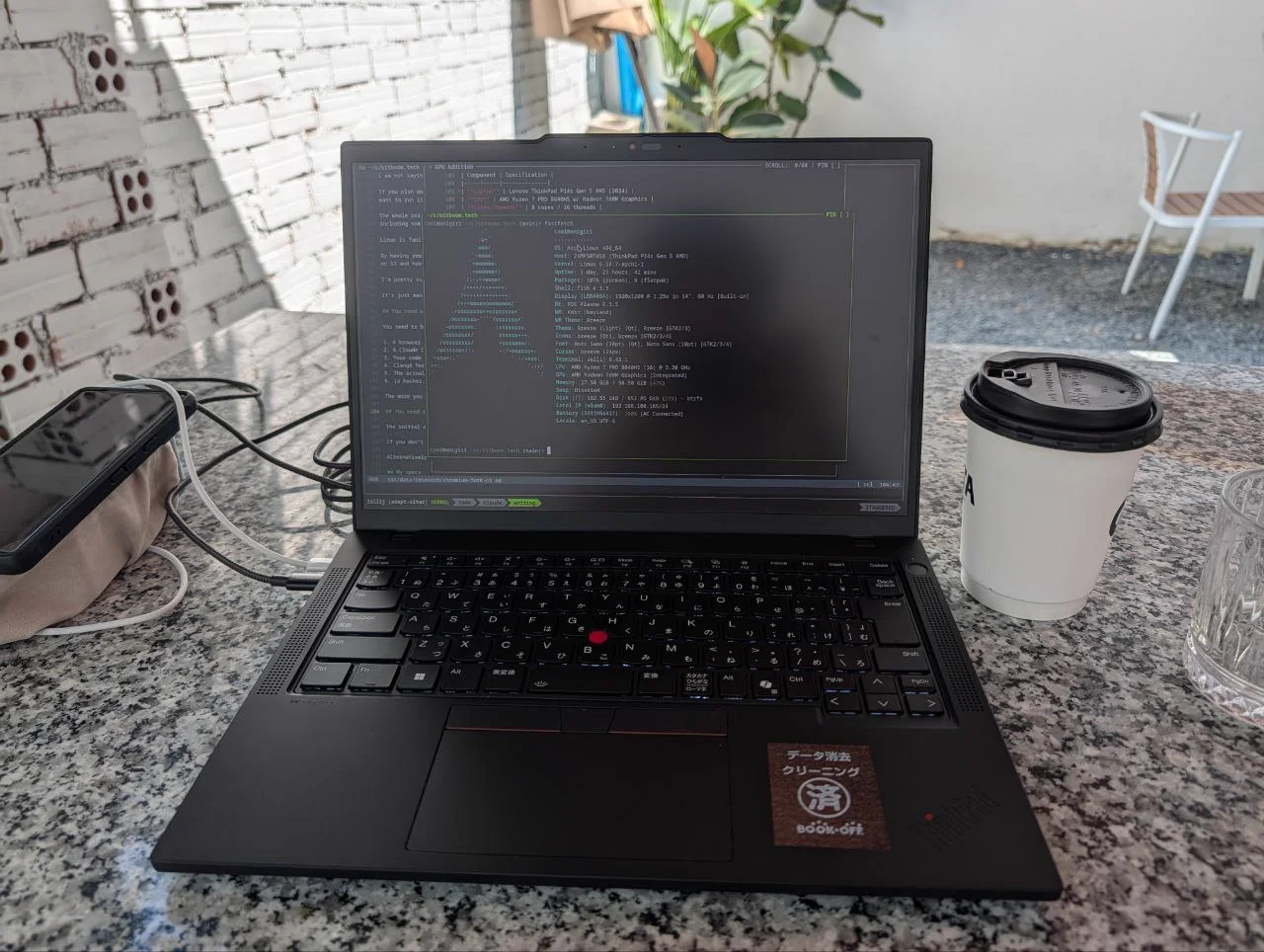
Meet onigiri!
Stay tuned!
Stay tuned for part 2: downloading the codebase!